
A tileable texture generator for your ground, walls and water
A repeating surface covers more of the screen than any hero, so a ground in the wrong palette shows on every frame. asset texture paints an opaque, tiling surface in the look your game already keeps. The cobbled path on this page came from the Meadowfall run, asked after its look, and it carries the same bright cel-shaded colours as the village it winds through. You describe the surface; the look supplies the style, the light and the camera.
npm install -g @tyrbo/assetMake a key in the Tyrbo app, then run asset login. Add --mock to try any command free first.
The commands
asset look meadow "bright cel-shaded fantasy village, warm sun" --view isometric
asset texture path "a cobbled dirt path"
asset texture pond "shallow pond water over pebbles" --view top-down
asset texture wall "mossy stone blocks" --view front
Made by the CLI, not drawn for this page
Real files the asset CLI wrote, each under the command that made it.
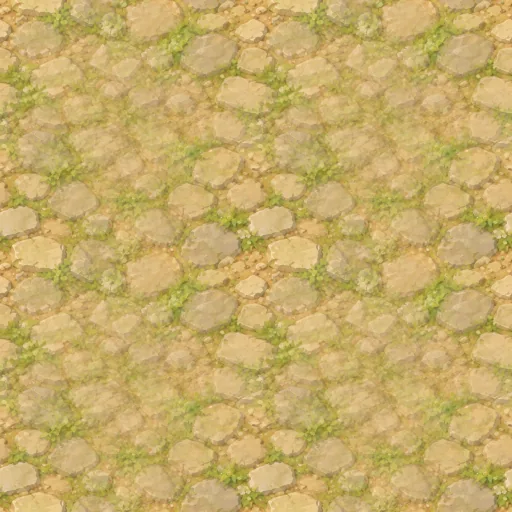
asset texture path "…"Asked in the look you keep
Every texture is sent with your look's picture as its reference, its words as the style and its camera as the angle, so you never repeat the style words in the ask. Name the material and its state: "a cobbled dirt path", "packed snow with boot prints", "rough planks, old varnish". --view changes the angle for one surface: a floor seen from above in a top-down game, a wall seen front-on, a slope seen from the isometric camera. --ref adds a picture to draw from, such as an older surface of yours, and the look still rides after it. --no-look asks without the look, for a surface that belongs to no scene.
Opaque, and made to repeat
A still from asset image comes back transparent, standing on its bottom edge. A texture is the opposite: every pixel solid, and its edges meet, so a grid of copies reads as one surface. Set it to repeat across a floor, a tilemap's ground, a 3D plane or the backdrop of a scrolling level. Because it is a plain picture, any engine that repeats a texture can use it as it is.
The file lands as <name>.png in ./public/assets/, or wherever TYRBO_ASSET_OUT points, and the call prints one JSON line naming it.
Surfaces worth a call each
- Ground: grass, sand, cobbles, mud, snow, a dungeon's flagstones.
- Walls: brick, logs, cave rock, a castle's dressed stone.
- Water and liquids: a stream bed, a pond, a swamp, lava.
- Finishes: a roof's shingles, a rug, a tabletop for a card game.
Ask one surface per call and keep the words short. A texture asked before is answered from your account's cache for free, so asking the same path twice costs nothing, and --mock runs the command offline while you wire the files into your game.
One palette under every sprite
Textures are where a game's art often splits in two: hand-made sprites over ground from a pack. Asked in the same look as your characters and props, the path, the pond and the walls share their light and their colours. That holds for a cel-shaded village or a pixel art dungeon alike, since the style is the look's and not the texture's. When the interface comes, the UI generator draws its frames in that same world.
Questions people ask
Is a texture ever transparent?
No. A texture is opaque edge to edge, made to repeat. For a thing that stands on the ground, a rock or a chest, ask asset image instead, which returns a transparent picture.
How do I get a floor for a top-down game and a wall for a side view?
Pass --view with the camera for that one surface: top-down for a floor seen from above, front for a wall faced square on. Without it the texture takes your look’s camera.
Can I ask for a texture with no look at all?
Yes, with --no-look, for a surface that belongs to no scene. Without the flag, every texture is asked in the look your game keeps.
Install it, then ask for the look.
Get an asset keyMake a key in the Tyrbo app, then run asset login. Add --mock to try any command free first.