
Cel-shaded game assets for a whole game
Cel shading is a promise: light falls in two or three hard steps and every shape wears a dark line. Break it once, with a softly lit chest or an unlined coin, and the screen looks assembled from strangers. Meadowfall, the village on this page, was asked as a bright cel-shaded fantasy seen from an isometric camera, and every file shown here was made after that look and inside it.
npm install -g @tyrbo/assetMake a key in the Tyrbo app, then run asset login. Add --mock to try any command free first.
The commands
asset look meadow "bright cel-shaded fantasy village" --view isometric
asset character hero "a young adventurer with a red scarf and a satchel" --clips idle,walk
asset image props "a gold coin with a star, a glossy red heart" --names coin,heart
asset mesh knight "a knight in plate armour and a blue tabard" --rig biped
asset render2d knight --view isometric --clips idle,walk --bands 3 --outline 2
asset startscreen "the meadow village at dawn" --title "Meadowfall"
Made by the CLI, not drawn for this page
Real files the asset CLI wrote, each under the command that made it.
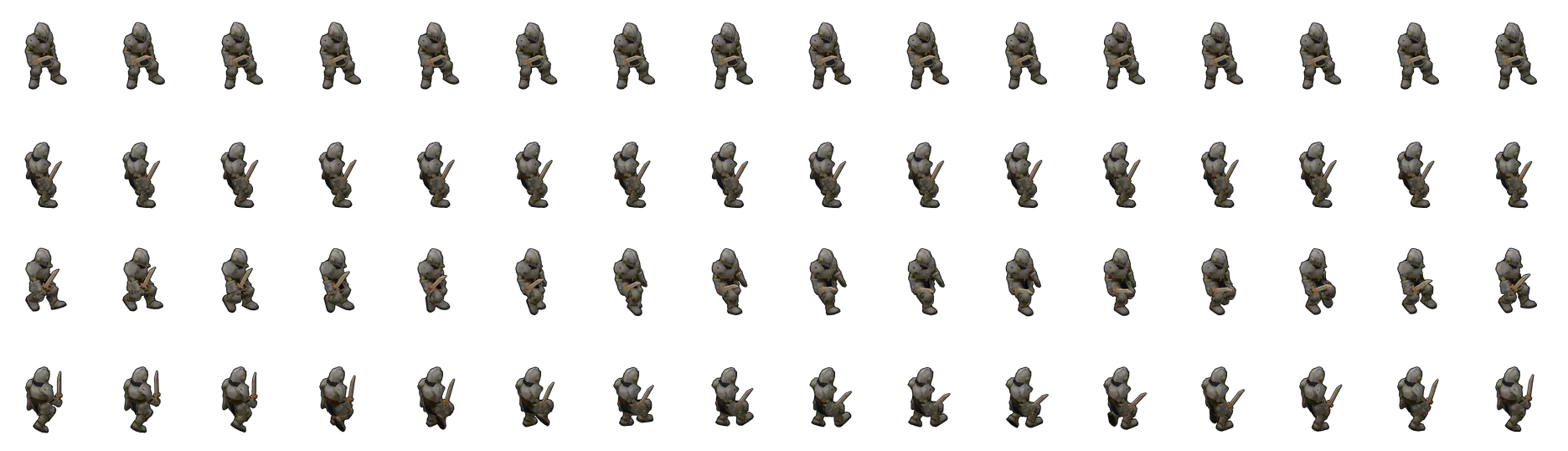
asset render2d knight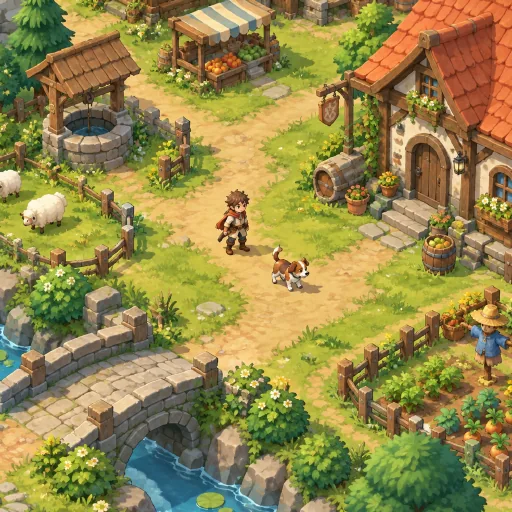
asset look meadow "bright cel-shaded fantasy…" --view isometric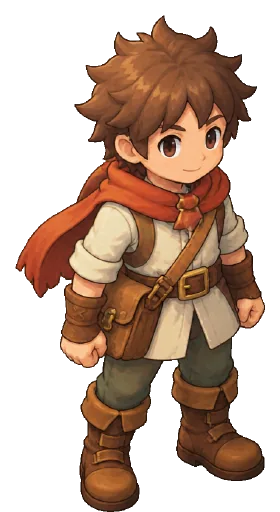
asset character hero "a young adventurer…" --view isometric --clips idle,walk
asset image chest "…"
asset image props "…" --names coin,heart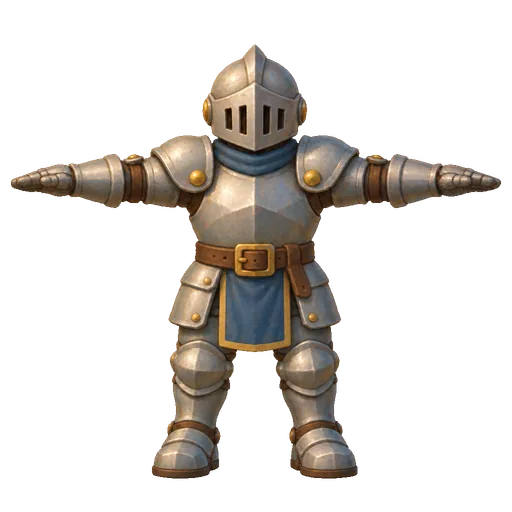
asset mesh knight "…" --rig biped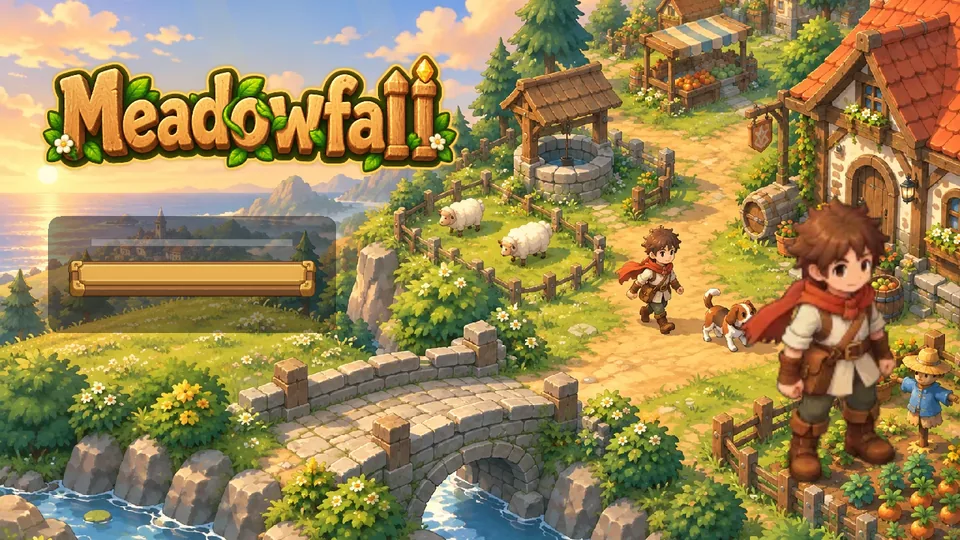
asset startscreen "the meadow village at dawn" --title "Meadowfall"Where Meadowfall’s bands came from
The look scene is the first picture here: cottages, a well, a market stall, a stone bridge over a stream, and a hero with a dog on the path. Those few words, bright cel-shaded fantasy from an isometric camera, are all the style the run ever stated. The hero, the chest and the coin were asked by what they are, and each call sent the meadow scene along as its reference, so the scarf, the chest’s iron bands and the coin’s rim were drawn in the village’s colours and light. Put your style in the look once, and keep each later ask about the thing itself.
A clash is named, not hidden
Each lone picture is read beside the look scene at play size. If it clashes, say it came back softly airbrushed or with a ground drawn under it, the report flags it with what it should be instead, and you ask again leading with that fix. A line a little heavier than the scene’s, or shading a touch softer, is not counted as a clash. You decide what to redraw; nothing is redrawn behind your back.
A 3D knight, lit like a cartoon
The walking knight on this page started as a 3D model. asset mesh drew his design in the meadow look first (the plate armour and blue tabard picture shown here), sculpted a textured .glb from it and bound it to a biped skeleton. Then asset render2d played his clips and drew every frame from the game’s camera, for free:
--bandssteps the light into that many tones; 3 is the default, 0 renders it smooth.--outlinerings the figure in a dark line, 2 pixels unless you say otherwise.- The key light rides with the camera, so his front and his back are lit alike.
Each frame is drawn twice as large and halved, so the outline stays clean. A render reads the model’s own colours, so check the turntable before you render. The sheet, its atlas and knight.anim.json are the same files a drawn character gets.
The title screen, made last
asset startscreen runs once the art and the interface exist. It designs the screen from the game itself, letters the name Meadowfall as a logo and reads it back, paints key art in the look around where the logo and menu sit, and previews each screen. The desktop preview is among the pictures on this page. Every step after the look borrowed its bands and its line; the isometric version of this run shows the camera side of the same story.
Questions people ask
Do I need a 3D model to get cel shading?
No. Every drawn picture follows a cel-shaded look on its own. The render route is for when you want a character made in 3D and played as 2D frames at your game’s angle.
How many bands should I ask for?
Fewer bands give harder, flatter steps of light, and 0 turns the stepping off. Since rendering is free, try a short --clips idle render at two settings and keep the one that sits best in your look scene.
Was the knight’s sheet drawn by hand?
No. It was rendered from his rigged model by asset render2d, which costs nothing. Only the model itself was a paid call, quoted before it ran.
Install it, then ask for the look.
Get an asset keyMake a key in the Tyrbo app, then run asset login. Add --mock to try any command free first.