
A game UI generator that draws the interface in your game’s look
A menu pulled from a generic kit tends to look borrowed, because it was. asset ui starts from the scene your game already keeps, the one asset look drew, and paints the interface in its material and light: carved wood and brass for a sunny village, carved wood and leaves for a painted forest. You say what the interface is made of and its mood. Back come a skin cut to stretch, a sheet of icons, a layout for every screen your game runs on, and a preview of each one, all in public/assets/ui/.
npm install -g @tyrbo/assetMake a key in the Tyrbo app, then run asset login. Add --mock to try any command free first.
The commands
asset look meadow "bright cel-shaded fantasy village, warm sun" --view isometric
asset ui "warm carved wood and brass" --desktop --vertical-phone
asset ui --edit "the coins bounce and throw stars"
asset ui --parts slot,dial,needle
Made by the CLI, not drawn for this page
Real files the asset CLI wrote, each under the command that made it.

asset ui "warm carved wood and brass" --icons coin,heart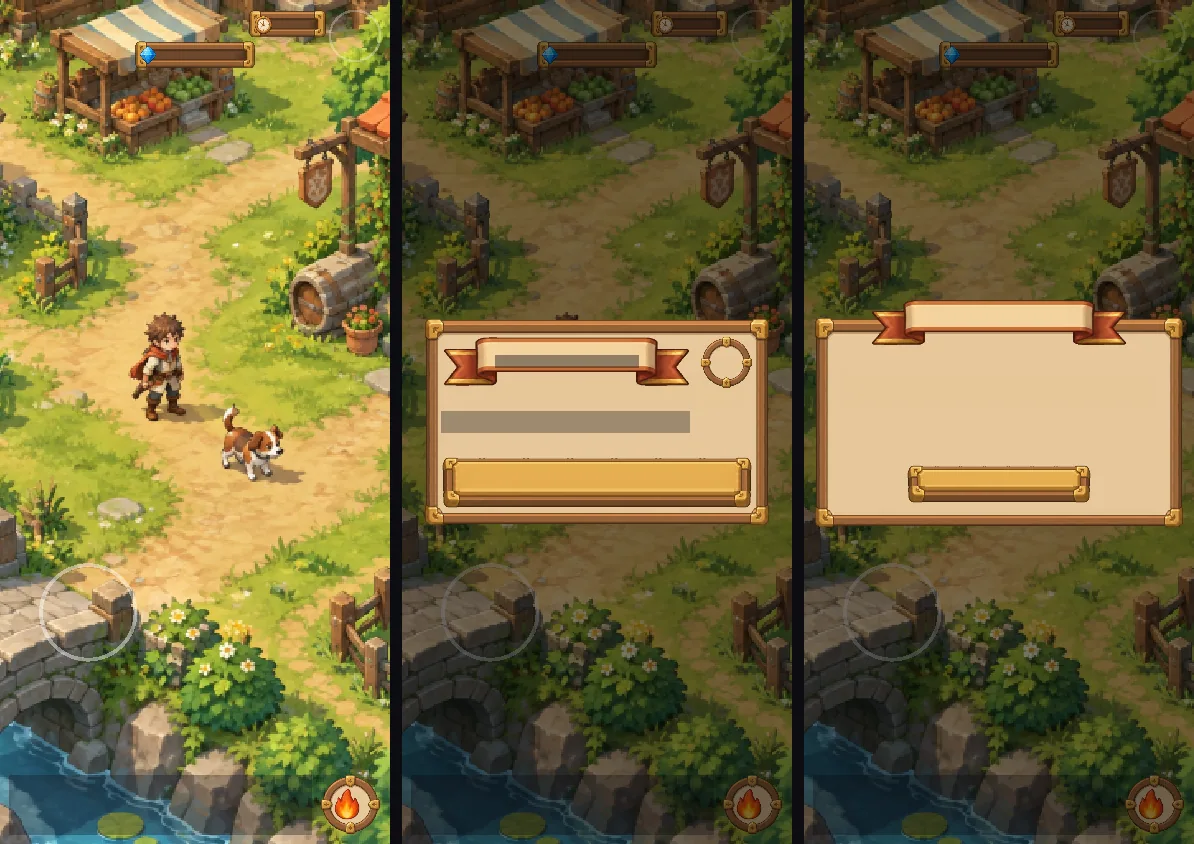
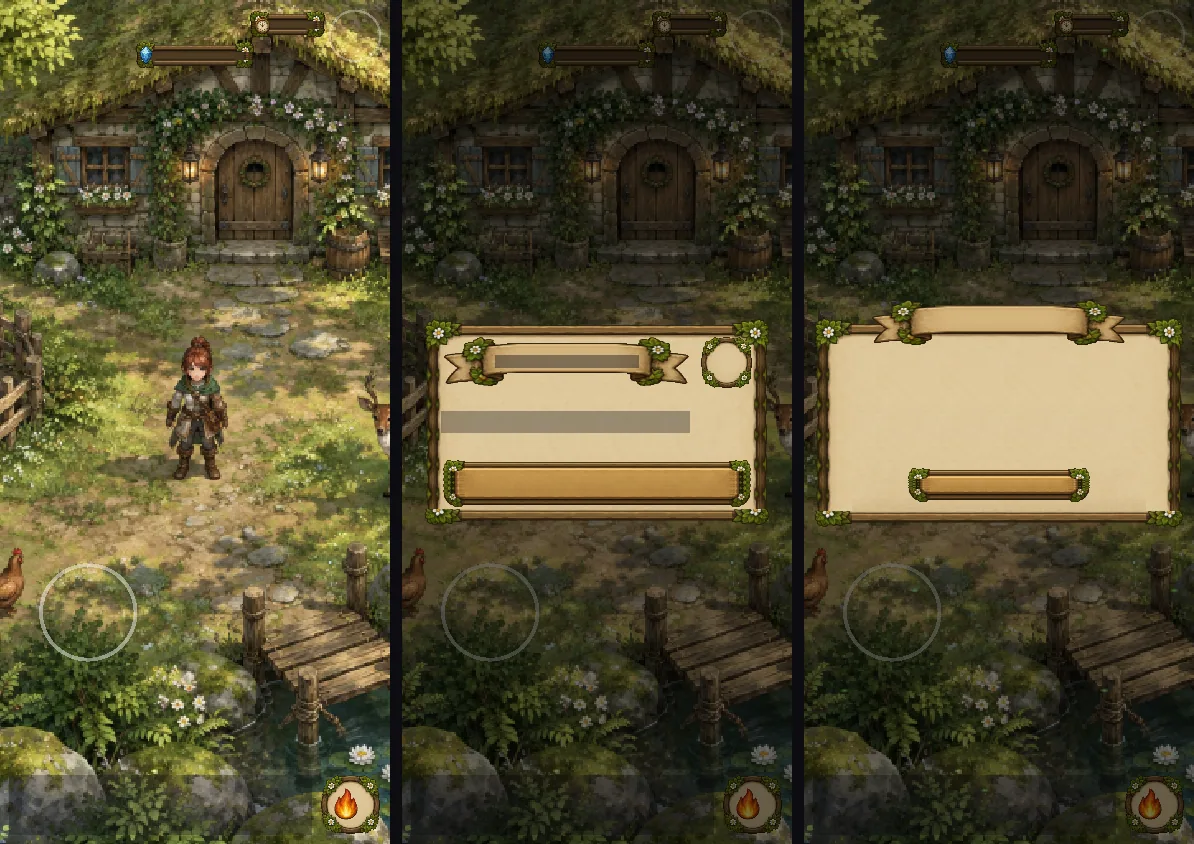
asset ui "carved wood and leaves"
The skin, piece by piece
First one picture is painted in your look holding the skin: a panel, a button, a plate, a meter with its fill, a title ribbon and a round badge. They are asked flat and front-on, lit from above, trimmed only at the corners, their faces plain and free of text, because lettering or a carving across a face cannot stretch. Each piece is then cut as a nine-slice. Its corners stay as drawn, its edges repeat, its centre is rebuilt, so one panel serves as a narrow tooltip or a full window without smearing its trim. A piece painted at a slant, or one that would show a seam once stretched, is left out rather than shipped broken, and the kit's plain look stands in for it. The colour of its text is taken from the art and held to 4.5:1 contrast against the face it sits on.
After the pieces comes a sheet of 64 icons in the same material: those your counters and actions wear first, then a set picked from your words and your rules. Every one is cut to its own file and kept in ui/ui-icons.json, so the coin on the HUD and the coin in the shop are one picture. The icon generator adds more sets later, matched to these.
Every screen laid out and previewed
Your interface rules (src/ui.rules.json, or the file --rules names) list the counters, meters, actions, gauges, rows of slots and menus, each tied to a value in your game's state. The layout is placed by rule for each screen you ask: --desktop at 1280 by 720, --horizontal-phone at 844 by 390, --vertical-phone at 390 by 844, or --all. Counters flow from the top-left, meters from the top-right. On a phone the first action sits biggest in the bottom-right corner with the others round it, none under 48 px, and the bottom-left stays clear for a thumb stick.
A model then places the HUD for this game in particular and picks its effects: a coin spins and throws copies of itself, a heart beats, a key swings. --no-bespoke keeps to the rules alone. Each screen comes back as ui-<screen>.png, the interface over your look's scene, and a last look at every preview writes what seems wrong into ui/UI.md and drops an effect that does not belong, such as a drift across a panel the player has to read. --no-review skips that look.
What your project gets
ui.json, the package the game wears at boot: the skin with each piece's cut, inset and ink, every screen's layout, the effects and a version.ui/UI.md, the page to read: each screen's pieces and their spots, the move each button plays, how to shift a piece and how to change the effects.- The cut pieces, every icon as its own file, and the previews.
Hotbars, dials, tabs and toggles go past the seven. When your rules call for them they are painted as a request of their own in the skin's material. A dial's face is checked as round and its needle as a thin pointer with a pivot, so it turns about the middle of the face. --parts asks for named ones later, drawn over the kept skin without painting it again.
Changing it later
--edit "<the change>" asks for one change in plain words, the coins bouncing, a gothic face, the lap counter moved to the top, and keeps the skin and everything the words leave alone. --ref with a screenshot or a UI kit paints the skin in that picture's frames, trim and palette as a new kit of its own, nothing lifted from its scenes. Run with no words, the interface is laid out again over the skin it has, free. A look that CSS draws cleanly, neon, flat or wireframe, gets no painted skin unless you pass --skin. The two interfaces on this page show the range: the same command in a cel-shaded village and in a hand-painted forest.
Questions people ask
Do I need a look before asking for a UI?
The look is what the skin is painted to match: its style, palette and light. Ask asset look for one scene first, as both runs on this page did, and the panels and icons will sit in that world.
Can the skin follow a screenshot of an interface I like?
Yes. Pass it with --ref and the skin takes that picture’s frames, trim, material and palette as a kit of its own. The icons and the extra parts follow the skin.
Does it lay out games held upright and sideways?
Each screen is laid out on its own: a desktop, a phone sideways and a phone upright. Ask the ones your game runs on, or --all, and each gets its own preview.
Install it, then ask for the look.
Get an asset keyMake a key in the Tyrbo app, then run asset login. Add --mock to try any command free first.